Library/Show Me Your Stack 8
The Browser Is the Interface Everyone Abandoned
Why chat manages intent but not state, and how Elliot O'Connor of Frontier puts Clay and MCPs one click from the rep
Most sales teams still pay six figures for a contact database the reps do not trust. The data is stale, the exports are manual, the CRM update is a separate step, and somewhere between the research, the enrichment, and the send, hours of rep time disappear per account. The fashionable fix is to move the rep into a chat window and call it AI. This episode is a live argument against that: the rep stays in the browser, and the intelligence comes to them.
In episode eight of Show Me Your Stack, Elliot O’Connor runs the argument live. He is the founder and CEO of Frontier (formerly Exportly), which has raised thirteen million dollars from investors including operators at Cursor, EF, Pave, and Reddit, and counts Cursor and an 800-plus-rep Zoom deployment among its customers. In this episode he screen-shares the live product: a Chrome extension that puts Clay’s data and MCP-driven workflows one click away from the rep, on the pages where selling happens.
The stack on screen is a Chrome extension, Clay tables, Salesforce MCP, Clay MCP, and Sales Navigator. The tool list is not the story. The story is where the intelligence lives: in the browser, on the page the rep already has open, behind buttons the rep never has to prompt.
Watch now: Elliot O’Connor - Founder & CEO of Frontier
The full episode is on YouTube. Subscribe to the channel for the clips and cuts that never make the write-up.
The Wiring: Clay’s Data Under the Rep’s Surface
The build starts where reps start, on LinkedIn. A year ago Frontier was a deliberately simple extension: move contacts from LinkedIn and company sites, enrich them with contact data, push them into the CRM and the sales engagement platform. The difference was what sat underneath. Every email and phone number came from Clay tables, which meant the rep was pulling from the widest array of data vendors in the market without knowing Clay existed. Clay’s superpowers belonged to RevOps and marketing ops. The extension’s job was to extend them to the average rep, in the interface reps already trust.
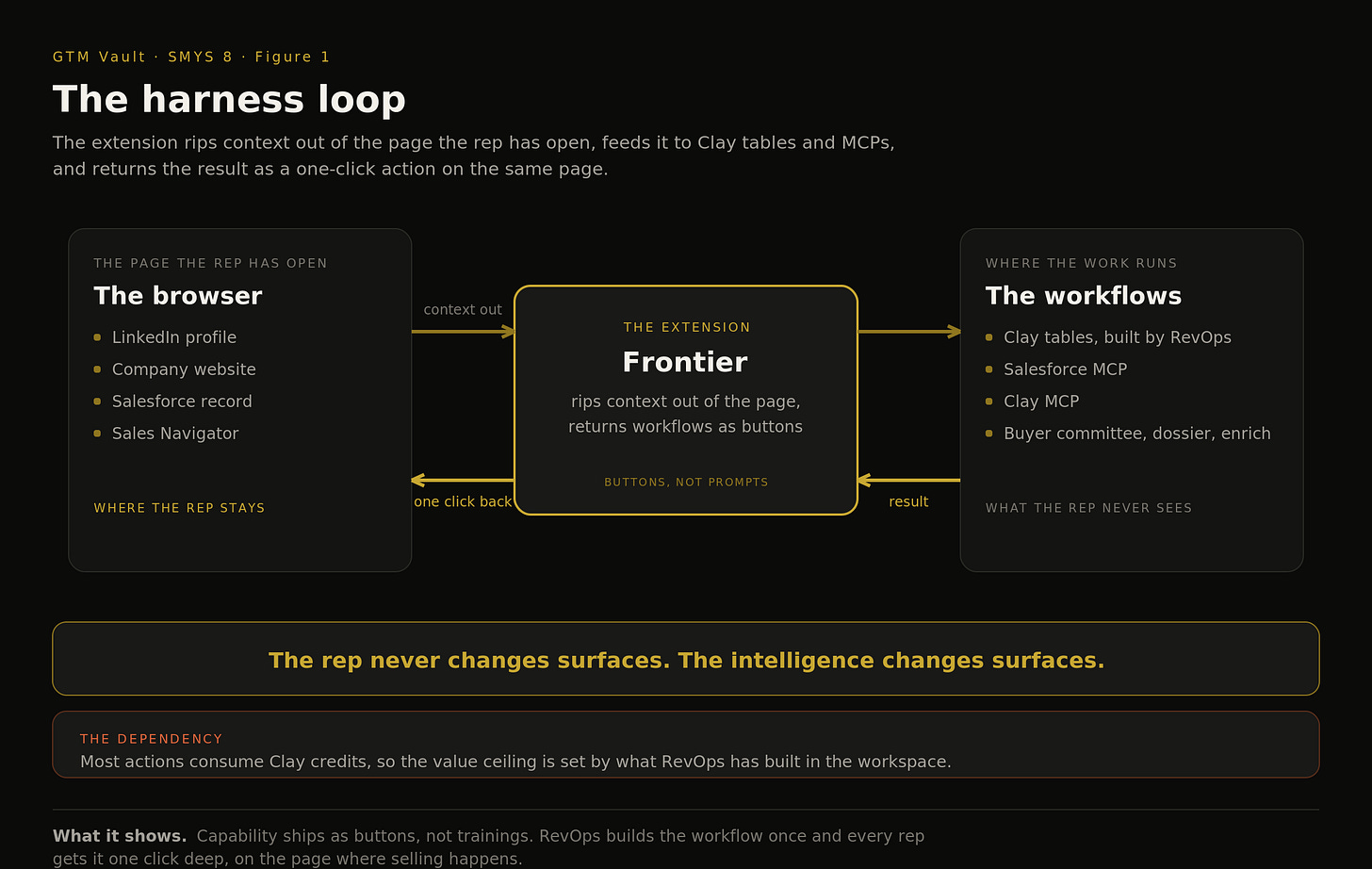
Figure 1. The harness loop: the extension rips context out of the page the rep has open, feeds it to Clay tables and MCPs, and returns the result as a one-click action on that same page. What it shows: the rep never changes surfaces, the intelligence changes surfaces.
The Gate: Why There Is No Install Button
There is no self-serve install, on purpose. A seller with one or two reps does not need the flexibility Frontier sells, and a self-serve user hits a wall the moment value depends on Clay-side build. The buyer is almost always RevOps, someone who already owns and loves Clay, at a company where the ops team lives in Clay world while the reps live in a ZoomInfo world. Deployment closes that gap with generated templates, Frontier’s API can create Clay tables inside the customer’s workspace, plus a forward-deployed GTM engineer on every account to tune them. Elliot’s larger claim rides on this: sales used to be about labor, it is increasingly about orchestration and design, and the sales leader and the RevOps leader now set strategy as equals.
The Harness: Chat for Intent, Browser for State
The demo’s sharpest moment is an argument about interfaces. The industry’s default answer is to move selling into a chat window. Elliot’s counter: chat is great for expressing intent, but for managing state, for managing large lists of people, browser interfaces are still far better. A rep juggling fifty to five hundred accounts is managing state, and a chat thread loses it with every scroll. So Frontier built its own AI harness inside the browser: it pulls records from Salesforce through the Salesforce MCP, queries Clay’s MCP for who you sell to, and pushes the rep into Sales Navigator with a generated search no human would have assembled. The rep bounces between chat mode and browser mode without leaving the page.
The Buttons: Prompts the Rep Never Writes
Every workflow in the extension is a button, and every button is a prompt the rep never has to write. Frontier’s position is that prompting is a waste of time and tokens for salespeople. One click returns the buyer committee for the account, tuned to the ICP, with a Clay table running underneath. Another runs a company analysis before a meeting: Clay agents crunch the account and return partnerships, hiring acceleration in go-to-market, and the Chicago office that opened four weeks ago. RevOps builds the workflow once, and every rep at the company gets it as a click, pages of them in a single interface.
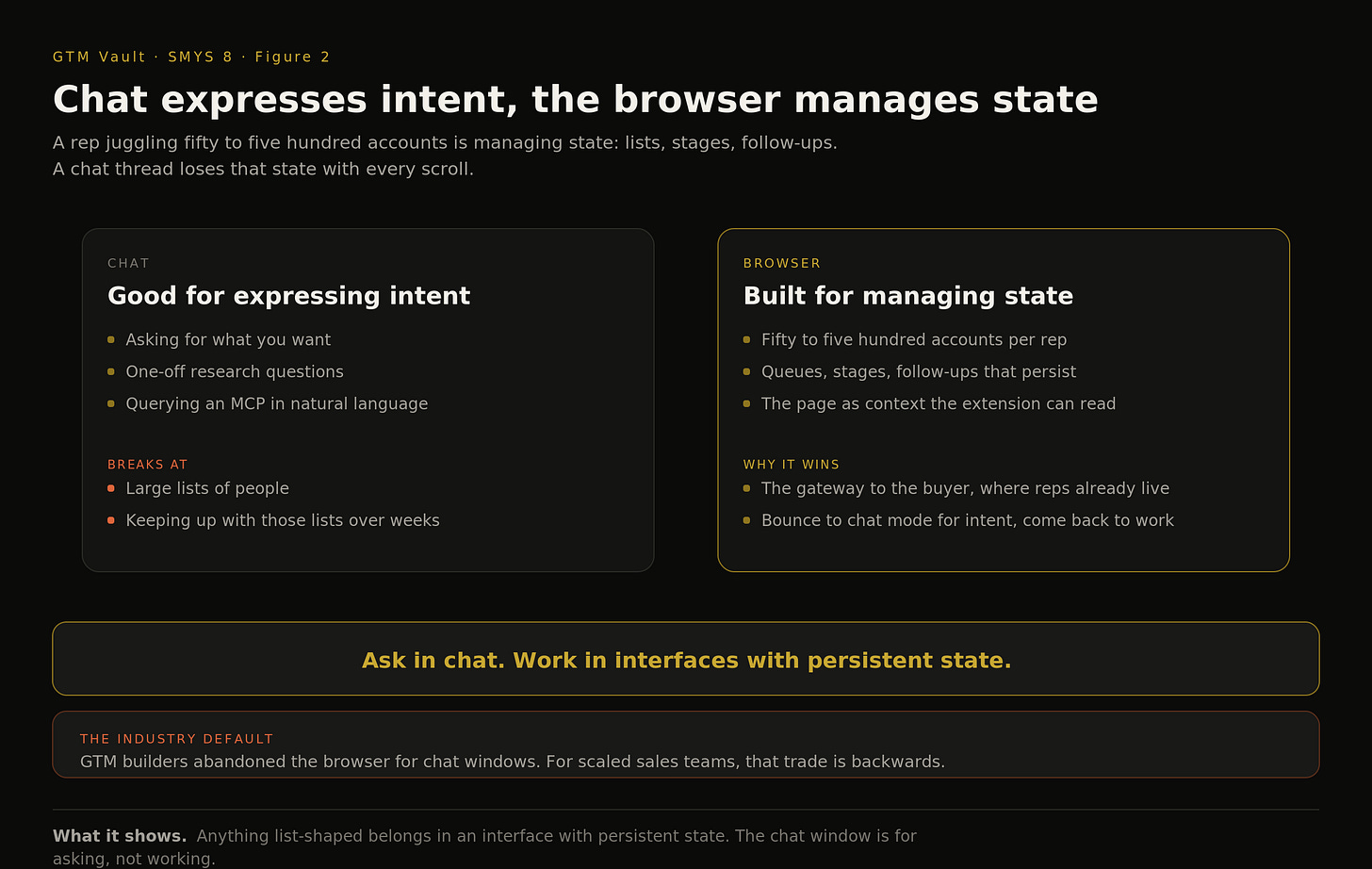
Figure 2. The split: chat expresses intent, the browser manages state. What it shows: anything list-shaped, accounts, queues, follow-ups, belongs in an interface with persistent state, and the chat window is for asking, not working.
The Economics: Seats on Top of Credits
Pricing is old-fashioned SaaS seats, with usage-based AI credits arriving for the MCP features that cost inference. The dependency to see clearly: most actions run on Clay tables that consume the customer’s Clay credits, so the value ceiling is set by what RevOps has built in the workspace. Asked directly whether Frontier is a wrapper on Clay, Elliot takes the question head on: it started as one, and what it became is an AI harness, the same relationship Cursor has to the model providers. Customers and investors can decide how thick the wrapper is. The business he is in is making the best rep surface possible on top of it.
Where This Goes: More Products, Same Surface
Elliot’s forward claim is that the Chrome extension undersells the vision. Frontier’s bet is that reps still want to prospect in the browser, that GTM builders have forgotten and underinvested in it, and that the extension is one product of several they will release to bring AI to the pages where reps work, on Salesforce, on LinkedIn, wherever the buyer is.
The Pattern
Every SMYS episode is one operator showing where the work happens, and this one relocates the question. The industry is racing to move reps into chat windows, and Frontier is betting the opposite: the browser is the gateway to the buyer, and the winning move is bringing intelligence to the rep’s surface rather than moving the rep to the intelligence’s surface.
What it changes is who ships capability. RevOps stops being the team that runs enrichment requests and becomes the team that builds buttons. The gap between what ops can do and what reps can access, the gap ZoomInfo-plus-Clay companies live inside, closes to one click.
The rule: ship capability as buttons, not trainings.
Five Things Worth Stealing
- Chat expresses intent, the browser manages state. A rep working hundreds of accounts is managing lists, stages, and follow-ups, and a chat thread forgets all of it. Put asking in chat and working in interfaces with persistent state.
- Every button is a prompt the rep never writes. Prompting is overhead for salespeople. RevOps encodes the workflow once, and the whole floor gets it as a click with a Clay table underneath.
- The gate is the onboarding, not the demo. No self-serve, because value depends on Clay-side build. Generated templates plus a forward-deployed GTM engineer per account is the distribution model.
- RevOps is the buyer now. The extension sells to the team that owns Clay, and rep tooling decisions increasingly run through revenue operations, negotiated as equals with sales leadership.
- The wrapper question has a harness answer. Frontier rides on Clay’s credits and data the way Cursor rides on model providers. The moat is the surface and the rep experience, and the market prices how thick that is.
Timestamps
(0:00) The hours that disappear per account
(2:05) Ground zero: the extension on LinkedIn
(3:52) Why there is no self-serve install
(6:30) RevOps as the buyer of rep tooling
(10:52) The AI harness: prospecting through Salesforce MCP
(13:19) Chat for intent, browser for state
(14:30) The buyer committee and company dossier buttons
(19:27) Templates and forward-deployed GTM engineers
(20:56) Seats on top of credits
(22:02) Wrapper or harness, the Cursor analogy
Links
Follow Rick on LinkedIn - https://www.linkedin.com/in/rickkoleta/
Follow Elliot on LinkedIn - https://www.linkedin.com/in/elliotoco/
Try Frontier - https://www.befrontier.com
Previous episodes include
- SMYS 7 | Your Reps Should Never Meet Your Agents
- SMYS 6 | From Five Hours in Clay to Forty Minutes in a Terminal: Outbound Run by Claude Code
- SMYS 5 | From Account List to Monitoring Universe: Building the Prioritization Layer
If this was useful, hit like and restack at the top of the post.
Show Me Your Stack is a GTM Vault series. Each episode features one operator walking through the system behind their outbound, their prioritization, or their pipeline motion. No slides. Just the stack.
Full transcript
Machine-generated transcript from the episode video. Speaker labels are not included and some names and product terms may be transcribed phonetically.
[0:00] prompting is a waste of time and tokens for everybody who's in sales. Each one of these button clicks would be a prompt in chat GPT. And so what our extension does is it rips the context out of the page and feeds it into MCPS or feeds it into play tables. You can just see how many individual workflows each rep at my company has access to in a single interface. If I'm going into a meeting, it will give me a quick little dossier on the company and tell me about their hiring in go to market. For example, this one is now going to give me the list of people I should sell to at Harvey. But behind this is a very powerful play table. Welcome to GTM Vault. Most sales teams still pay six figures for a contact database that reps do not trust. The data is stale. The exports are manual. The CRM update is a separate step. And somewhere between the research, the enrichment, and the scent, 3 hours of rep time disappear per
[1:04] account. Elliot O' Conor watched this happen at enough companies that he decided to rebuild the workflow from scratch on top of Clay with a Chrome extension that handles the whole chain. Today, we are watching it run. Elliot, it's such a pleasure to have you on the show. Yeah, I know. Thanks for having me, Rick. It's great to be here. And uh I thought I'd uh I thought I'd come into the kitchen cuz I know we're going to be cooking in this episode. So uh I'm looking forward to getting into it. Yeah. Yeah. I love that. So Elliott Oconor is the founder and CEO of Frontier. You may have heard of that, which you may know as Exportly. So the recent rebrand and having raised $13 million from investors including operators at Cursor, EF, Pave, and Reddit. I'm so excited to learn about this Chrome extension of yours.
[1:56] Should we dive right in? Yeah, let's do it. Absolutely. Happy to screen share and take us take us away. So, just find the screen share. So, yeah, I think like all Chrome extensions for sellers, I'll start off in the most obvious of places just because I think that's Here we go. That's that's uh kind of ground zero for most most sales reps. They want to know how it works on LinkedIn. So I'm going to show it to you here first and explain kind of also the philosophy behind the product. Right. So you mentioned Zoom Info and and you know there have been so many Chrome extensions that have come before us, right? Zoom Info, Apollo, Cognism, etc. What we set out to do was to build a Chrome extension that connected to Clay and allowed sellers to, this was, you know, a year plus ago, allowed sellers to access Clay's data, which Clay, as many of your listeners will know, has like amassed probably the the widest array of data vendors in the world. And so that was accessible to
[2:58] RevOps, it was accessible to marketing ops, but it just wasn't accessible to to to the average sales rep. And so we wanted to build an interface that was more rep friendly. And that's what brought us to a Chrome extension. And so we set out initially a year ago to build a you know a Chrome extension quite simple really that would enable you as a rep to do the things you were trying to do as a sales rep 12 months ago which was you know moving contacts from websites like LinkedIn company sites uh enrich them with contact data move them into your CRM move them into your sales engagement platform. So, you know, it does all those things and as I'm doing them here, it's using in the background, it's using all of Clay's data to do them. So, if I'm asking for, you know, an email or I'm asking for a phone number, I'm getting it from Clay Tables. And, you know, we built this in particular for for bigger teams. So, you asked me before this uh this recording was turned on, you asked me why do we not have just like a a self-s serve button on our on our
[4:01] websites. Why can't you just click to install it? You know, most of our customers, as you can see on this on this little card, for example, most of our customers are bigger enterprise. And we we built this for teams who have, you know, 50 or 100 or, you know, a thousand sellers and they're connected to a Clay account and they want to build custom workflows inside of that Clay account and then they want to actually connect those custom workflows that the RevOps team has built, they want to connect them to an extension so that their entire sales rep team can use it. And so that started out as a very simple thing just sending prospects to Salesforce which you know you know is kind of table stakes for most teams.
[4:44] That's an interesting point you bring up. So yeah because sales reps aren't the ones building the clay tables in most cases, right? And so they're not necessarily the decision makers either for what kind of tooling is used within the sales department. And so having a gated demo instead of having a, you know, productled like a a premium or premium or even an extension that's just easily accessible, easily downloadable, and then you give them maybe like a reverse trial where you give them a a portion of the app for free to use or excuse me, a portion of the the B what is it called? Like a Yeah. a portion of the Chrome extension app that's free to use. You didn't take that approach. Instead, you gated it.
[5:40] Yeah. Yeah. We gated it. Uh, you know, I think for the reason that uh, you know, our ICP is is larger companies. We we found that, you know, if you're a really small company, you probably are using different tools than than what we've built. And the reason is that uh you know a seller with one or two sales reps doesn't want to have the flexibility that we provide. We we provide teams with an an extreme amount of flexibility and that's our strength. So you can connect our extension Frontier formerly known as Exportly. Some of your audience might might know us as Exportly. You you can connect it to as many Clay tables as you want and then you get to build out all those clay workflows. And so, um, you know, I'll show you, you know, that that send to Salesforce that I just did.
[6:30] Yeah. Who who's the one booking the call? Like the CRO or is it like the VP of sales or the the sales manager? Where in the hierarchy does it fall? I mean, obviously, needless to say, it depends on the size of the company. Yeah. It's usually RevOps. It starts in the RevOps department and it's usually someone who already owns Clay cuz it's usually someone who's who's who's basically adopted Clay internally at that company loves Clay and often that company is using Clay plus a Zoom Info or or Apollo uh and their sales reps are living in the Zoom Info world but their RevOps team is living in Clay world. And so what we built is the first like open Chrome extension, interoperable Chrome extension that allows you to connect uh you know whatever data vendors you're using. So Clay, it also connects to MCPs now. So it's it connects to Salesforce MCP and Clay MCP. And so it's it's more open-ended than other Chrome extensions.
[7:29] So the RevOps team is usually the first one to come in and and use it because they they they sort of acknowledge that hey like we've got these superpowers the go to market engineers typically have and we want to we want to extend those superpowers over to you know our sales reps our our account executives our SDRs and that's that's kind of typically where it starts. Yeah. Very interesting. Yeah. So you have re revops influencing the tooling of the sales department essentially. Yeah. Absolutely. Yeah. Yeah. And I think I think it speaks to, you know, I think RevOps is growing in its influence nowadays because, you know, sales used to be about labor and now, like most departments, it's it's increasingly about orchestration and design and people that are, you know, influencing that are more and more so people in that kind of revenue orchestration, revops, those kinds of functions more so than than traditionally any sales. Of course,
[8:32] sales is still the spearhead and the revenue generating function. Uh that needs to be supported by all the RevOps, but for them to perform at the at the rate that other teams are able to perform at, I think RevOps has to have a bigger say than they've had in the past, and they have more capabilities than they've ever had before, thanks to teams like Clay and and what we're building. Yeah, that that's that's a big change in the way how in the way that's a big I want to say that's a transformation in the way that revenue teams have traditionally been run where it was more of a top down kind of whoever the sales team who was bringing the money had more kind of uh decision-m power over uh what kind of tools were used through pretty much throughout the the whole revenue department.
[9:22] Whereas now you're seeing a supporting role emerging into a position where it's it's really influencing the way the larger revenue organization is run. Yeah. And I and I mean and I I don't know if you meant this, but to me I feel like you know sales was always the the unquestioned leader in the sales or the the kind of the had the last say. And I and I feel like now their revenue counterparts in in a lot of the orgs we speak to are at the very least uh being raised to equal equals, you know, the the sales leader and the revenue operations leader are having a an equal equals conversation about what the strategy is going to be and how to implement it because I think everyone recognizes that human labor is not enough to to achieve the targets that we need to hit in order to to grow at the rates that companies are expected to grow. You can't just hire more headcount and and you know smile and dial. Uh you
[10:26] need to leverage technology and the people that are going to help you do that or in the revops department. So you know where where we started 12 months ago was was you know with functionality like the one I'm showing on the screen which is we just started out to set out we just set out to build a very simple but but great Chrome extension that was powered by the world's best data provider which was Clay. you know, doing the things reps have always done. Hey, I want the email. Hey, I want to send to Salesforce. Hey, I want to send to my sales engagement tool. And now it's kind of evolved into a whole lot more, which is like basically an AI harness. So, a seller can say, "Hey, I'm in my salesforce. I want to prospect new prospects. I want to get a whole new set of prospects for Air Table and Aden." And today, you know, typically reps are having to do that either manually or they are told to go to like chat GPT and type things in and they're using this kind of chat GPT interface. But what we as Frontier believe is that the the web browser is still this incredible interface much much better to use for prospecting than just a just a a screen
[11:29] of full of text on chat GPT. So we built our own AI harness that will allow you to do things like prospect. So I'll show you that right now. Uh so it basically can pull records from your Salesforce using Salesforce MCP. It can then also query other MCPs like Clay's MCP and knows who you like to sell to and it can also then push you into other websites like Sales Navigator. So it's able to leverage great databases that are basically far more contextrich and far deeper in their data than any Chat GPT result could ever produce. So here we're able to produce with AI an incredible set of titles that no human rep could have ever produced in a few clicks for both of my companies. So every rep at our customers companies can like produce can produce amazing sales nav searches with uh with with that functionality for example.
[12:28] Great. Yeah. And most enterprise sales teams will have sales navigator right in most most cases for their sales reps. Yeah, exactly. you know, I I think you know, compared to most of the most of the people who maybe have come on your on your on your uh your show before or indeed the the people watching a lot of people obviously are go to market engineers and they're you know the idea of using sales navigator or using LinkedIn at all is probably like they're thinking holy like this this looks archaic right that's kind of that's kind of the the mentality and and everybody's like we need to just use chat interfaces or uh we need to be using uh I don't know tables we need to be using you know but when you you know depending on where you're coming from you know if you have a very large sales team that's very you know scaled across the world you know running chat interfaces actually is not optimal you know chat is great for expressing intent but for managing state
[13:31] for managing large lists of people uh and and kind of keeping up with those lists of people we we found and all of our customers have found that these kinds of interfaces are still far better to use. So, you know, they they prefer they prefer these and they prefer using MCPs. So, here they can go back to AI mode and and chat to an MCP and just bounce between, you know, chat mode and and kind of browser mode. And uh would would your your browser extension send the messages on the rep's behalf or is that part on the rep? Yeah. So that's this that's the thing about the tool. Uh when when you kind of extend it, it it connects to any workflow you want, whether that's via an MCP or via uh our unique connection we have with Clay. So you can build workflows that automate, you know, message generation or, you know, here I'll show you if I go to a company's website. I have a bunch
[14:34] of different workflows. And as a rep, you know, each one of these button clicks would be a prompt in chat GPT. But what we try to do is just abstract away the prompt. We're just like, we don't want prompting. We we think prompting is a waste of time and tokens for everybody who's in sales, but we just want you to, you know, get what you want. So, for example, this one is now going to give me the buyer committee, which is the list of people I should sell to at Harvey that's tuned to exactly who I want to sell to. But behind this is a very powerful clay table, which is I'll show it to you right now. It's actually running. Here it is. So, this is our column in clay, which is a unique column in clay. The reps will need to have clay credits to perform these tasks within Frontier.
[15:21] Yes. Yes. Mo most mostly most actions are powered by clay tables that consume clay credits. And uh yeah, essentially like this one I just showed you here, which is the beauty of this is it's all in one interface. I'm not switching between browsers. No, I'm not I'm not logging into Clay. Um and and and and that's what our objective is. Our objective is to bring clay and also now AI which is what our whole like AI mode updates are about to the browser because we feel like everyone who's building in go to market has kind of abandoned the browser and has said has said hey just just chat to you know chatpt all day long. But we think for most most sales teams they're going to go into the browser. In fact, most of their day is spent in the browser because that's the gateway to the marketplace. That's the gateway to the buyer. And we need to be able to bring AI into the browser. We cannot make it so that the only place to access AI or to the place to access a clay
[16:23] table is you have to like I don't know go to chatgpt and start typing and lose all the context that's in this page because this page is full of context and I should be able to access it. And so what our extension does is it rips the context out of the page and feeds it into MCPS or feeds it into clayts. And that's that's kind of, you know, our philosophy is like making making the web browser your your your AI harness. Yeah, I can see how this improves the productivity of a sales rep. Any idea of what kind of timesaving that it can provide? Yeah, I mean depends on, you know, uh, what you're doing. So, I'll show you one example which I think will just, you know, explain it better than I could, which is if I'm going into a meeting and I want to with Harvey and I want to, you know, know everything about this company and I'm selling go to market software, which is what I'm selling. I need to have a quick, you know, dossier on them. So, my RevOps team built me this this thing called company analysis. I click it and it will
[17:26] basically run clay agents on this company to tell me everything I need to know with prompts that were pre-built that will crunch this company's data and it it will give me a quick little dossier on the company and tell me about their hiring in go to market and all these different things. So in here it is so it can just now tell me everything about it product partnerships and go to market. So they've expanded their collaboration with market. They launched purpose-built legal agents and they're hiring acceleration for account executive roles across major markets, New York City, Toronto and opened the Chicago office 4 weeks ago. Fantastic. So you know for an account executive obviously that's saving them a lot of time that they would use to just prepare for a meeting alone.
[18:10] The buyer committee is another one of the very popular workflows that just obviously saves people a ton of time looking for for the correct prospects. Yeah, the unified interface is uh it seems like that's the main value proposition here. I mean, if I were, you know, if I if I had a I had chat GPT open and cloud open and then I had my Google Docs open and I had the browser open on LinkedIn, like now I have four different tabs and the the potential to like lose data or lose track of one of those data points. It it becomes a lot higher than if I have it all in just one unified interface in front of me dynamically.
[18:55] Yeah. Yeah. I could see a lot of value in that for a sales rep who's uh juggling anywhere from 50 to 500 accounts, right? Yeah. And these are all the all the workflows that are connected to my version of of Frontier. So, you know, this is, you know, and there's multiple pages. So, you can just see how many individual workflows each rep at my company has access to in a single interface. to your point through the single extension. And how do you unlock these? Like does the RevOps or the GTM engineer need to build these or are these accessible to any user within the platform? You have to pay extra for some of those workflows.
[19:40] Yeah, good question. So, it's part of the reason why we gate it as well. So, you know, uh when people come in self-s serve, they just, you know, they realize, I need to actually build a lot of stuff on the clay side or with MCPS to actually, you know, get get value. So, what we did is we also built out a huge library of templates. So, you can see it here. There's templates and we have special powers inside of Clay with our API. So, we can generate Clay tables automatically inside of your workspace. So, when we click that button, it'll generate a a template. And then we also for every deployment every customer they get a go to market engineer from us on their account for deployed and they will build out the the the template. So the templates will be generated but often with every template you know there's a bit of tuning and customization that a customer might want. So we we we we give them a for deployed go to market engineer and you know it depends on the customer but you know a cur cursor uses us obviously all all over the world and and they they have all kinds of different reps doing all kinds of different things and then you
[20:43] have a zoom using us with you know 800 plus reps they have all kinds of different tables for different use cases. So every everyone's got their own use cases and tables that they build out over time. Yeah. Got it. And what's your uh what's your pricing or what's your monetization model? Yeah, it's actually refreshingly simple, I'd say, for for the the the AI era that we're in. Okay. It's it's just good oldfashioned seats. All right. It's just good oldfashioned SAS seats. Yeah. So, we we charge by seat. And also, you know, some of these some of these features. So, this one, for example, I'm showing you is actually powered by Salesforce's MCP, but it's some of these MCP features we built out are completely free for us as well to the customer, which is kind of neat. But some of the MCP features that we're rolling out will be additional charged via like, you know, usage based AI credits because they obviously cost
[21:47] inference for us and to the customer. So there will be an a usage component if you want to use uh the AI piece but the core platform running any any table I've shown you is completely just usage based unlimited exports. Yeah. Would you if you were to Yeah. it I hate to to simplify it to to it's it's like could could you say at it as it at its current state you're somewhat of a rapper on top of clay? Yeah, I think a lot of people a lot of people have said that we started I I'd say definitely as a uh a rapper and I think what we have become and I think it might be difficult to see it kind of quickly here but what we've become is a is an AI harness. So you know we're we're very similar to cursor. Cursor is a wrapper on top of chatpt sorry you know claude and and and their models.
[22:46] And so obviously some people would say hey I instead of using cursor I want to go and use codeex and cloud code and you know they're welcome to but cursor is still doing really well and cursor does some things that you know uh really help their customers and and create value. We're similar to Cursor. We we've built a lot of really useful features uh on top of the base functionality that Clay offers and Salesforce MCP offers and we continue to invest in that to make the rep experience exquisite and and increase their productivity. So that's the business we're in is just making the best rep tool possible and the best rep harness AI harness possible for the browser. I'm looking at some of our customers there.
[23:28] We're probably all somewhat similar in that regard. Yeah. What what we're all about is the browser. Um, you know, I think I think the Chrome extension almost misses the the the the bigger vision for us is that we believe strongly that reps still want to go to the browser to be able to prospect and that teams have kind of forgotten and underinvested in that. And our Chrome extension is one product of of I would say a few that we'll release to make the browser more compelling and to bring AI into the browser so that reps can still be able to use it and prospect in it. We want them to to be able to use all of that. That's kind of what we're we're all about.