Library/Show Me Your Stack 9
The First Thing a Signal Agent Does Is Throw Signal Away
Michael Bartimer, GTM engineer at Clarify
GTM Vault is a breakdown of how high-growth companies design, test, and scale revenue architecture.
Every GTM engineer runs the same quiet sprawl. An enrichment workflow here, a follow-up agent there, a Zapier chain nobody remembers building, each one solving a real problem and all of them together a second job. Michael Bartimer works inside a CRM workspace running more than a hundred agents and almost none of that sprawl, because they all live in the system of record. The GTM engineer at Clarify joins Show Me Your Stack for episode 9 to screen-share the two he is willing to open in public, a website visitor agent and a PQL scoring and routing pair, and to decline the premise the episode was booked on. He does not think the automation layer is being deleted.
About Clarify
Clarify is an AI-native CRM that connects to a team’s email, calendar and call data and uses a built-in agent to log interactions, summarise meetings, update pipeline and run workflows without being asked, which is what the company means by autonomous CRM. It was founded in 2024 in Seattle by Patrick Thompson, who previously co-founded the data tooling company Iteratively and sold it to Amplitude, alongside Ondrej Hrebicek, Iteratively’s former CTO, and Austin Hay, who had been an Iteratively customer. The company onboarded hundreds of teams through a pilot before opening the platform publicly, and employed roughly two dozen people at its Series A. Clarify has raised $22.5M, including a $15M Series A led by USVP and Gradient with Madrona, Recall, Ascend, Essence, New Normal Fund and Fika participating, and in 2026 it acquired the San Francisco startup Seam AI.
Watch now on YouTube
Download the transcript
GTM Vault SMYS 09 Michael Bartimer Transcript
75.5KB ∙ PDF file
Episode highlights
(0:00) Cold Open: Over A Hundred Agents Inside One CRM
(0:40) The Sprawl Every GTM Engineer Is Quietly Running
(3:49) Inside The Agents Section: The Website Visitor Agent
(4:42) How He Briefs Rep: A Ramble, A Ticket, Or A PRD
(6:42) The Stale Data Problem And The LinkedIn Fix
(9:07) Reading A Live Run, And How Fast It Stood Up
(11:02) Start With Visibility: Why Slack Is Step One
(12:31) The PQL Agent: Seven Signals Out Of 100
(14:34) Four Routing Paths And The Ten To Twenty Second Review
(18:20) Why He Calls It Consolidation, Not Deletion
What you’ll learn:
- Why a website visitor agent spends its second step deleting people, before anything is classified or written anywhere
- Employees, competitors and existing customers: the three suppressions that run before any classification is allowed to happen
- How to treat a data vendor’s company field as a hypothesis, using the LinkedIn profile already in the payload
- Vendor data is often six or twelve months stale, and sometimes twenty-four or more, pointing at a previous role
- Why visibility in a Slack channel is the deployable version of this play and outbound is the upgrade
- How much less of your own site traffic sits inside your named personas than your model assumes
- Seven signals scoring a PLG signup out of 100, half of them tool calls out to the product analytics
- The four routing paths, and the ten to twenty second human review that nobody on the sales team wanted removed
- Why the workaround runs through an outside vendor and still has an end date
- Why he declines “deletion” and measures speed to deploy and iteration cycle time instead of tool count
Key takeaways
1. The first job of a signal agent is to throw signal away.
The website visitor agent takes a de-anonymization payload through a webhook and parses out name, title, LinkedIn and company. Its very next move is removal: employees browsing the site, named competitors, and existing customers are all suppressed before any classification runs. Only what survives gets sorted into an ICP, and only then does persona resolution happen at the person level.

Figure 1. Run the same steps with the filter at the end and everything downstream is working records you were never going to work.
2. Stale vendor data is a pipeline step, not a procurement decision.
Michael’s name for it is the stale data problem, and his numbers are blunt: provider data is often six or twelve months old and he has seen instances twenty-four months or more out of date, still pointing at the person’s previous employer. His fix does not involve a second vendor. The agent opens the LinkedIn profile already sitting in the payload, resolves the current company, and then re-runs the whole workflow against the corrected record.
3. The specification was the work. The build took minutes.
The PQL agent was one of the first things he built after joining four months ago. The build path is the interesting part: analysis in Claude Code, output into a Notion doc, a few rounds of team feedback on that doc, then the doc handed to Rep, Clarify’s built-in AI, which planned and drafted the working agent in minutes. Seven signals score a PLG signup out of 100, about half of them tool calls to the product analytics and the rest properties already in the CRM.
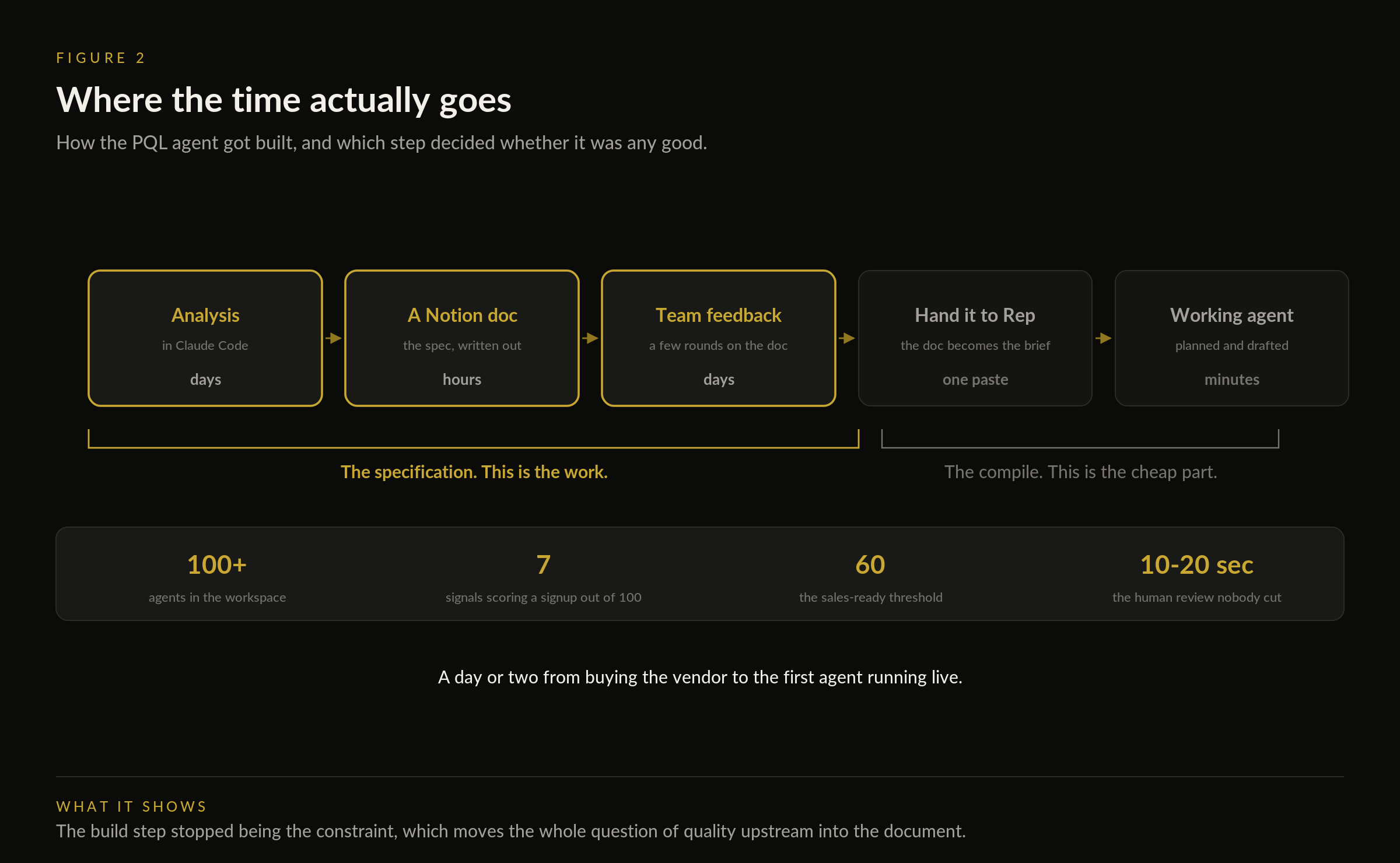
Figure 2. When the compile step is this cheap, the quality of the system is decided entirely in the document nobody counts as building.
4. Nobody removed the human. They removed the hour around the human.
The routing agent splits into four paths. Path one is immediate sales outreach on firmographic criteria and it still passes through a person, because the sales team wants a ten to twenty second look before enrolling the account in a campaign with one click. Path two nurtures toward a PQL score of sixty or greater, the threshold at which an account is classified sales ready, which makes this a lightweight first version of a product-led sales motion.
5. He declines “deletion” and calls it consolidation, which is a claim about speed rather than tool count.
Clarify campaigns suit sales-led outbound and have gaps for marketing-led, so persona-specific enrollment runs through an outside sending tool with the outcomes written back for reporting. Michael treats that as two moves: build the workaround with outside tooling, then take the gap to product and engineering so the workaround expires. Six months ago the same work was spread across HubSpot, assorted automation tools and Claude Code, and what changed is that the pipes, the data and the reporting stopped living in different buildings.
Michael Bartimer
- LinkedIn: https://www.linkedin.com/in/michael-bartimer-9311b480/
- Clarify: https://www.clarify.ai/
Rick Koleta (Host)
- LinkedIn: https://www.linkedin.com/in/rickkoleta/
- Newsletter: https://gtmvault.co/
GTM Vault
- LinkedIn: https://www.linkedin.com/company/gtmvault
- YouTube: https://www.youtube.com/@gtmvault
- Website: https://gtmvault.co/
Show Me Your Stack - subscribe on YouTube
Show Me Your Stack lives on YouTube, because the screen is the episode. Subscribing is what tells the platform to put the next operator’s stack in front of more people who build these systems for a living.
Previous episodes include
See all previous episodes here.
Show Me Your Stack is a GTM Vault series. Each episode features one operator walking through the system behind their outbound, their prioritization, or their pipeline motion. No slides. Just the stack.
Full transcript
Full transcript of Show Me Your Stack episode 9, lightly edited for readability: names and product names corrected. Speech is otherwise as spoken, and timestamps refer to the recording.
[0:09] Rick Koleta: Every GTM engineer runs the same quiet sprawl, an enrichment workflow here, a follow up agent there, a Zapier chain nobody remembers building. Each one solved the real problem. Together they are a second job. Michael Bartimer's job is different. He is the GTM engineer at Clarify, the autonomous CRM, and his stack is an experiment in deletion. How much of the standard GTM automation layer disappears when the CRM itself does the work? Today we are watching it. Welcome to GTM Vault, trusted by twenty seven thousand plus founders and operators building the future of revenue. This is Show Me Your Stack, the series where operators screen share the systems they actually run. This show has spent the past few months watching operators bolt agents onto CRMs that were never built for them. My guest today works at the company making the opposite bet. Clarify is the autonomous CRM, an AI native system with a built-in agent that handles meeting briefs, data entry, and pipeline updates without being asked. The company raised $22.5 million in its first year with backers including USVP, Gradient and Madrona. Michael Bartimer is Clarify's GTM engineer, a self described RevOps Swiss Army knife, and today he's showing us the most credible test any tooling company faces. How Clarify runs on Clarify. Real workflow, real data, warts and all, anything confidential is blurred, not staged. Let's see it. Michael, welcome to the show.
[1:58] Michael Bartimer: Awesome. Thanks for having me, Rick. I appreciate that intro.
[2:18] Rick Koleta: Okay, so Michael, what specific workflows, tools and agents you do you wanna take us down the road today?
[4:05] Michael Bartimer: Awesome. so again I'm in here in our in our desktop app just in the agents section here and this is just all the agents in our workspace, right? Just to scroll down, like there's you can see the vast majority of them are actually enabled. So we are doing this for real. and there's a lot in here, but I'm just gonna go into this first one I wanna talk through is this website visitor outbound. and at the bottom here, let me just hide. This. at the bottom here we have Rep, which is our built-in AI that can do basically anything in the entire system. so I used it heavily and I'm not gonna kind of go through this agent in detail, but rather I'm just gonna jump in here and ask Rep, what does this agent do? Please explain it to me. And I'm just gonna let Rep. there's WhisperFlow popping up. I'm just gonna let Rep here. summarize kind of i exactly what this agent does. And anytime I'm I'm building an agent or workflow and Clarify, I'm just giving Rep either I'm just talking to Rep, e either just kind of doing a knowledge dump, like rambling with WhisperFlow, or I'm just pasting in a Linear ticket or I'm pasting in a Notion doc for something a little bit more kind of complex or thought through. I'll give it like a PRD style Notion doc that I've I've worked with. And it will go and actually plan it and draft the agent or workflow for me. So this is just giving me a much higher level, kind of step by step, of what this agent is doing. So we're we're pretty simply just using a Vector for website de-anonymization on our website. And then this is just a webhook that's ingesting the Vector payload. So the first step is it's just parsing the data from Vector. so things like you know, name, title, LinkedIn, company name, et cetera. and then I'm doing a lot of like disqualification up front, right? So disqualifying employees that are coming to our website, certain competitors, suppressing customers, and then we're getting into the classification. of different segments and ICPs and that's really what's happening here in step three. And then in step four, actually once they pass the ICP kind of company level qualification, then we're doing the person level persona resolution. So have basically I think six different personas in here and which we'll see in step six. but first in step five, just writing this data into Clarify from the Vector payload. and also maybe I'll I'll talk a little bit about how I'm solving the what I would refer to as like the stale data problem from a lot of these data vendors. actually just just simply just using the LinkedIn profile from the Vector payload and actually looking them, looking at their profile. And that's all happening via this agent. Right. and so it actually understands what what company they're currently at. Cause I've I'm sure many folks have seen numerous examples from all the data providers out there that oftentimes the data can be six, twelve, if not, I've seen many instances of twenty-four plus months out of date and looking at their their previous role. so this agent is solving that that stale data problem. and when it finds like the true like Current operational company, is that what I have it referred to here? Is it just runs them through the entire workflow here again and actually writes those updates in Clarify. so we're getting the correct data and resolution. and then right now I'm happy to talk about this more, but using Instantly right now for marketing led outbound. I think Clarify campaigns are good for sales outbound, but certainly have gaps at the moment that we're working on for marketing style outbound. so currently just you know automating enrollment to those persona specific campaigns in Instantly and then writing data back from from Instantly and to Clarify for you know meetings booked or certain outcomes for reporting. and then lastly just Posting to Slack, more of a enrollment confirmation in the thread. So we have a Slack channel called Website Visitors. You know, everyone who goes through this workflow is written into there for visibility, and yeah, for enrollment confirmation specifically, and a few other use cases, just threading and replies automatically for tracking. And here you can see at the bottom by the numbers. Yeah, a lot of lot of manual minutes saved. I'll I'll pause there. happy to continue on with this one. Maybe we can look at a specific run if you want.
[9:39] Rick Koleta: Yeah, yeah, that'd be great. Show us the run and if you wanna talk talk us through the results after the run.
[9:49] Michael Bartimer: Yeah, so I'm here at the sure at the top, just on the overview tab, I can always jump into the activity. and I can click into any of these. So let's just, you know, click into the most recent one. and this is just gonna give you the run summary here at the bottom. But if I scroll all the way top, I can actually see, you know, the thinking and what actually happened step by step, right? I could drill down and click into any you know, any of the tool executions, any of the reasoning, and see what the agent did here. but for you know verification it's you know the run summary at the at the end is gonna be the most useful.
[10:32] Rick Koleta: And and how easy is this to install this on to y say your your website?
[10:40] Michael Bartimer: I would say pretty easy. I mean I think we had it st I mean once yeah, once you go and buy the Vector in this case, I think we had it stood up in a day or a couple of days.
[10:56] Rick Koleta: That's great. And so this is great because you know, the sales team it's hard for the sales team to dynamically in real time identify who's coming to the site and then create a personalized email or even send a LinkedIn connection request, maybe in parallel. and with this automation with this webhook, companies are able to install that kind of a signal based outbound automation. Whereas traditionally it wasn't really possible, I wanna say like two to two years back or so it started becoming more and more accessible through these webhooks. And it looks like now you've made it a lot easier to install for any size company. Yeah.
[12:00] Michael Bartimer: Yeah. Yeah. Yep. Absolutely. and I mean I think this is just whether you want to call it a play or whatever. I think this is just the first like basic simple use case that any team can stand up, you know, within a few days, within a week. even just to I think there are like tons of companies out there that just don't have visibility into folks coming to their website and just streaming that into a Slack channel just so you can see visibility is I think a great step one for folks. And then you can kind of do outbound to you know certain people. And and just to give you some sense, I mean not specific numbers, but I think I think most companies would be very surprised, like if they listed out their top four, five, six personas within their couple ICPs. I think the vast majority of companies out there, a lot less of their website traffic would be in inside of those ICPs and personas than they would expect. if that makes sense. So
[13:07] Rick Koleta: Yeah, that's a good point. I mean, at the same time though, don't forget, like, unless you're you have like a paid advertising budget, your website's not getting a lot of traffic to begin with for I wanna say ninety nine percent of the B to B websites out there. And so, you know, you need to have certain motions in place before automations like this really take effect.
[13:35] Michael Bartimer: Yeah, that's a great point. That's a great point. that's actually a great segue. Let's talk about like PLG and PQL scoring as the next agent specifically. So I'm just gonna do the same thing and just gonna clear this new chat. And you can see it automatically pulls in the agent I'm on as the context. So I don't have to tell it to look at a specific agent. And I'll just ask it the same question. What does this agent do? so this is an example of something one of the first things I think I built at Clarify when I joined about four months ago. And this was one where you know I started in I mean just in Claude Code, did a lot of analysis, you know, the output of that was a Notion doc that I used for collaboration to get feedback from the team. You know, after a few quick like turns on that doc, just gave that Notion doc to Rep here and it built the agent in minutes, right? and this is one where you know using a lot of product usage data and like I would say half of these data points are a tool call out to PostHog to get that usage data and the other half are just in Clarify in and properties. so really you can kind of Build however you want or use whatever tools you want. And in this case, just firing on certain types of deals that are PLG deals, right, through website signups. and just using kind of seven signals in here, all different you know, product usage data points to just get to a score of 100. and yeah, pretty, pretty simple, I would say here. and if
[15:25] Rick Koleta: And so what does that score do? Does that sync with the CRM and then notify the sales Rep to identify and then start a conversation, yeah.
[15:35] Michael Bartimer: Yeah, exact exactly. Exactly. This one is just scoring all the, you know, all of the website signups, the PLG website signups, and then this next agent over here is the one that actually does the routing. so let's just say, what does this agent do? so this one, yeah, does the routing into I think three or four different tiers. the first one is immediate immediate reach out by sales. The next one is yeah, so here are the four paths. and this is where we actually have a human in the loop step. and currently the sales team just wants to do a quick review. I mean they do literally a 10, 20 second review of the account and just one click enroll them in their sales campaign out of Clarify. So that's that's path one based on some firmographic data points. and then path two is all about, you know, trying to get them to that PQL score of 60 or greater in order for them to be classified as sales ready. Right. So this is really I would say a lightweight V1 of what like a product led sales PLS motion would would look like. On top of PLG data being like very easily accessible by agents.
[17:00] Rick Koleta: Yeah, this is great. Traditionally you'd have to layer in product analytics and then figure out a way to route that to like your your main CRM, which in most cases can be like a Salesforce or a HubSpot. And then yeah, I mean connecting those two together it was a lot of steps and a lot of work, whereas it looks like you really boil this down to a very simple embed here.
[17:36] Michael Bartimer: Yeah. I mean the thing that I love about like being, you know, a GTM and engineer, like slash RevOps background at Clarify is like I can use Clarify for the pipes of basically anything I'm doing. and you know, where i we can maybe talk about campaigns a little bit. I mean that's outbound is obviously a big focus of GTM engineers and something I'm I'm working on at the moment. and as I kind of alluded to earlier, like it's clear campaigns in Clarify much more suited at the moment for sales-led outbound rather than marketing-led outbound. But this is, I mean, one of the reasons why I love doing this is not just because it's so easy to build and iterate and speed to deploy, I think is a is a really key advantage, but I'm also able to like you go out and use the tooling and vendors that you know most folks are using and build use those to build workarounds into Clarify and then work with our product and engineering teams to actually close the gaps. so yeah I would say super exciting and in the last you know four months since I've been at Clarify, like it's been really eye-opening to me in terms of how easy some of this stuff can and should be, where historically even six months ago, Yeah, even six months ago, like this stuff was I was doing this outside of Clarify in HubSpot and you know, various workflow automation tools, and obviously Claude Code, but so much of this being natively consolidated in a single system, specifically in the system of record, makes building and speed to deploy and iteration cycles so much faster and easier.
[19:30] Rick Koleta: Yeah, absolutely. anything else you wanna add, Michael, before we wrap up?
[19:36] Michael Bartimer: I think that's that's good on my end. I know we just have a few minutes left, so happy to answer any questions or talk about any other use cases briefly.
[19:49] Rick Koleta: Michael, thank you for showing us the real system, not a demo environment. The actual stack running live, deletions and all. Well I did you show us any deletions? Not really, right? All right, you didn't. Right. I'm gonna scratch that outro.
[20:10] Michael Bartimer: It's okay. I mean, these were like V1s of different use cases. I mean for website visitor outbound, I think our team was using something else like last year before I joined, but it didn't really work too well. but it's rather than deletion, I would refer to it as like consolidation of workflow automation in general for what I mentioned a minute ago in terms of Ease ease to build and speed to deploy and iterate.
[20:46] Rick Koleta: Right, right. I like that way of putting it. Michael, thanks for showing us how Clarify consolidates different workflows and tools into one unified interface, really making everything run smoothly and a lot more efficiently. Clarify's YouTube channel runs deeper walkthroughs for anyone who's interested, go check it out. And if this episode changed how you think about the automation Layer, subscribe to GTM Vault, share it with your network, and join us next week. Build systems, not noise. All right.