Library/Show Me Your Stack 2
MCPs vs APIs in a Production Enrichment Pipeline
Alexander Shartsis walks through Skyp's twelve-MCP Claude Code setup and why the production pipeline drops to direct APIs when volume and cost matter
The stack
Show Me Your Stack, Episode 2: Enrichment Pipelines in Claude Code
This episode: Alexander Shartsis walks through an enrichment pipeline built in Claude Code, backed by a production-grade system powering Skyp’s managed outreach. Over a dozen MCP connections. Direct API layer underneath. Stage 3 agentic workflow. The breakdown below maps the build back to the Revenue Architecture.
The Targeting Failure That Enrichment Is Supposed to Solve
Most outbound campaigns fail silently. The emails go out. The open rates look reasonable. Nothing converts. The post-mortem blames the copy, the subject line, the send time, the offer. It is rarely any of those things.
The silent killer is list quality. The people on the list are the right title at the right company. They match the ICP on paper. But they are not in market. They have no documented need. No signal. No timing indicator. The campaign was dead before the first email was drafted because the enrichment layer did not produce signal. It produced demographics.
Alexander Shartsis has spent a year building Skyp’s enrichment and outbound system. Before that, he led M&A at Opendoor, closing four acquisitions in six months for a public company doing over two billion in revenue. He has bootstrapped, raised, exited, and shut down companies. He built Skyp because the enrichment problem is not a data gap. It is an architecture gap. The tools exist. The APIs exist. The failure is in how they are composed, what order they are called in, and whether anything upstream validates the output before it reaches the send layer.
In this episode, Alex builds a basic enrichment tool live in Claude Code using plan mode and the Apollo API, then walks through the production version that runs Skyp’s managed campaigns at roughly fifty cents per lead. The gap between those two builds is the entire argument for why enrichment is architecture, not a feature.
The Live Build: Claude Code Plan Mode to Working Tool
Alex starts the build on screen. Claude Code in the terminal. Plan mode activated with Opus for planning, Sonnet for code generation. The prompt is specific: build an enrichment tool that uses web search to find signals about people and Apollo API for email and contact information. Run locally. Keep it simple.
Claude returns a plan. A Python script. Data sources, structure, output format. Alex pauses here and makes a point that most people skip: read the plan before you execute it. Claude’s plan mode is not a formality. It is the architectural review. If the plan calls the wrong APIs, structures the data incorrectly, or misses a step, fixing it after execution costs more tokens and more time than catching it in the plan.
The distinction between Claude Code’s three modes matters here. Edit-after-asking mode does not plan. It reacts to the immediate task, builds the thing in front of it, then discovers downstream dependencies. Plan mode thinks through the whole system first, breaks it into steps, then executes sequentially. For anything beyond a single-file script, plan mode produces a fundamentally different output. Alex uses it for every build.
Claude recognizes that Alex has already built a larger enrichment app in the same repo. It asks why it is building a smaller version. This is worth noting. Claude Code maintains context across the project. If you have existing code that overlaps with the new build, it will flag it. Alex redirects it to build a standalone example.
The build runs. Claude writes the Python script, wires up the Apollo API, adds web search for signal enrichment. The output is functional. A founder or operator could take this script, point it at their ICP parameters, and get enriched leads with contact information and web-sourced signals for ten to twenty cents per lead.
This is the baseline. What Alex builds next is the production layer that turns a script into a system.
The MCP Stack and When Not to Use It
Alex’s Claude Code environment has over a dozen MCP servers connected. He walks through the ones he uses most and what each one does in the workflow. But the architectural lesson is not “connect everything.” It is knowing when to use an MCP and when to drop to the API directly.
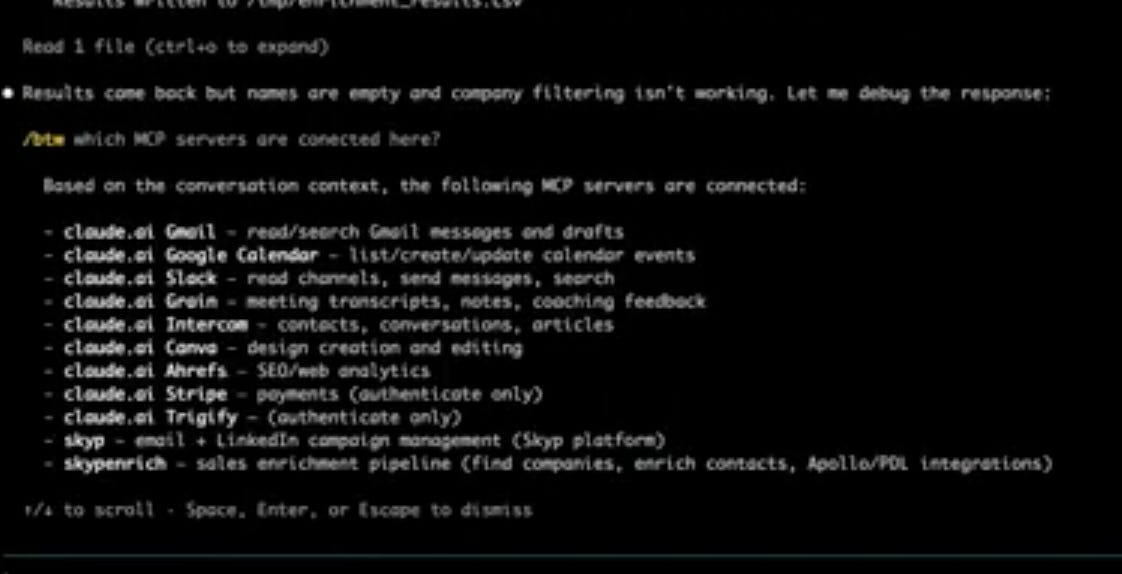
SCREENSHOT: Full MCP server list in Claude Code showing connected services including Skyp, Gmail, Grain, Slack, Intercom, Stripe, Ahrefs, Trigify, Canva, Calendar, timestamp ~08:49
- Gmail provides email history context. When building an outreach list, Claude can check Gmail to remove anyone Alex has already emailed. No manual deduplication. No CRM lookup. The MCP queries the inbox directly.
- Grain is the meeting recorder. It has an MCP that lets Claude query meeting summaries and action items. The use case is follow-up prioritization: who did Alex meet with this week, what was discussed, who needs a follow-up. The data lives in Grain’s interface, but the MCP makes it queryable from the same environment where the enrichment runs.
- Slack serves as the notification layer. Long-running enrichment processes send a Slack message when they finish. This is the difference between watching a terminal and doing other work while the system runs.
- Intercom handles customer support content. Alex built an automation that runs every morning: it checks new GitHub commits, identifies product changes, and updates or creates Intercom help articles automatically. New features get flagged to Slack for human review before publishing. Existing feature changes publish directly.
- Stripe provides the customer list. When building outreach lists, Claude pulls current customers from Stripe and removes them. No manual exclusion list. No stale CSV. The deduplication is live.
- Ahrefs is the SEO and SEM data source. Competitive intelligence, keyword monitoring, website performance. This MCP is more of a data feed than an action layer.
- Trigify monitors LinkedIn for signal data. It tracks people posting about specific topics and surfaces them as potential leads. The same function could be replicated with Claude web search, but Trigify packages it as a structured API.
- Canva lets Claude build slides, mockups, and logos without leaving the terminal. Alex uses it for quick visual assets.
- Calendar handles scheduling context. Meetings, availability, follow-up timing.
- Skyp is the send layer. Once a list is enriched and validated, Claude pushes it directly to Skyp to start or add to a campaign. The full loop, from enrichment to send, runs without switching tools.
The rest are Claude’s built-in connectors (web search and others visible in the MCP list) that Alex uses but did not walk through individually.
The architectural insight is the cost tradeoff between MCPs and direct APIs. Every MCP call consumes tokens because the LLM reads the MCP documentation, constructs the request, and processes the response. A direct API call is just the raw request. For occasional tasks (checking Gmail, querying Grain), the token overhead is negligible. For high-volume operations (enriching hundreds of leads through Apollo), the overhead compounds. An hour-long enrichment run becomes two hours. Two hours becomes four.
Alex’s production system uses MCPs for convenience and context tasks. It uses direct APIs for the enrichment pipeline itself. The decision boundary is volume. If you are calling something ten times, use the MCP. If you are calling it a thousand times, use the API.
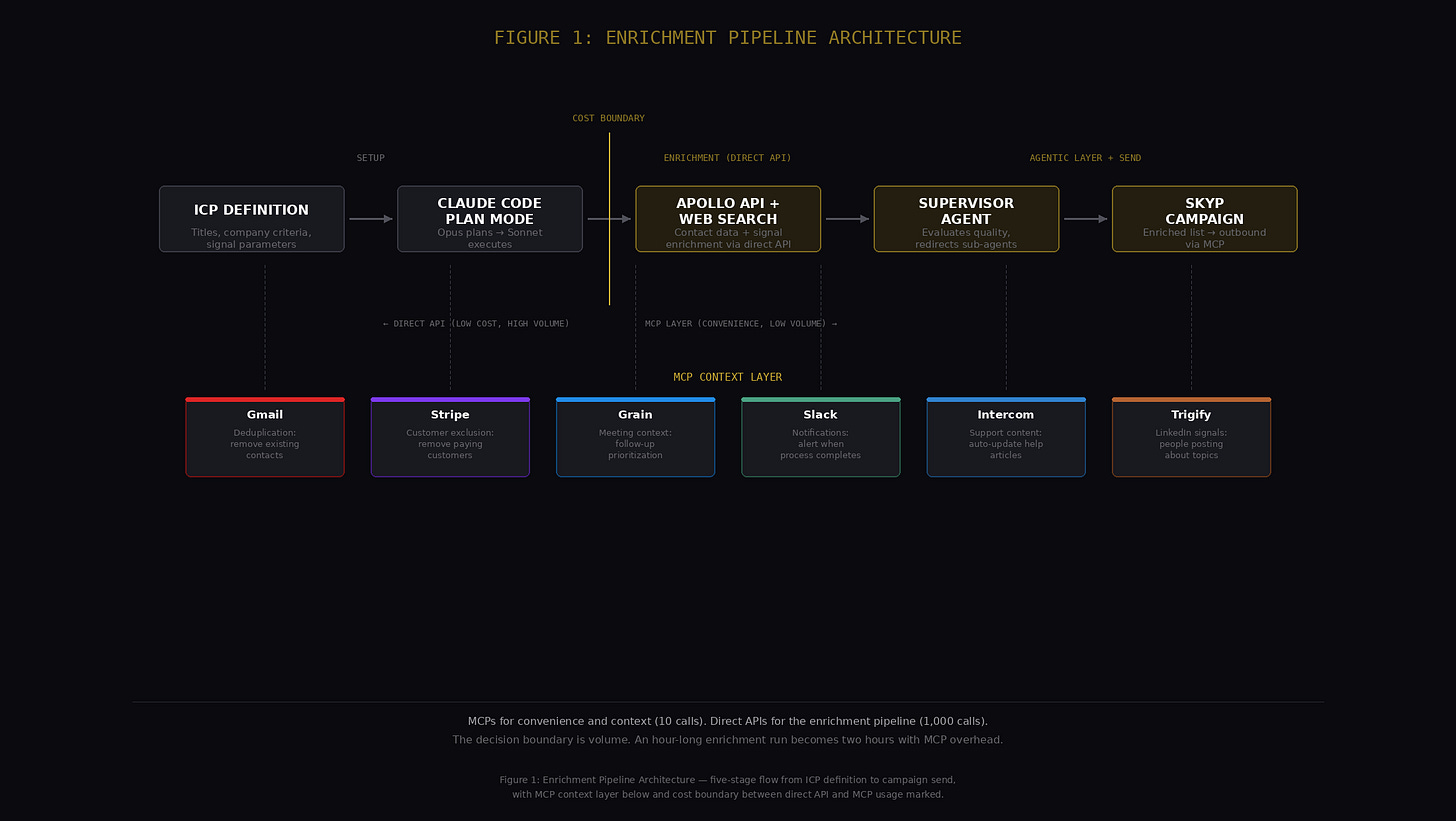
Figure 1: Enrichment Pipeline Architecture - ICP Definition → Claude Code Plan Mode → Apollo API + Web Search → Signal Enrichment → Supervisor Agent Quality Check → Skyp Campaign, with MCP layer (Gmail, Stripe, Grain, Slack) shown as parallel context feeds, and the cost boundary between MCP calls and direct API calls marked.
Full transcript
Machine-generated transcript from the episode video. Speaker labels are not included and some names and product terms may be transcribed phonetically.
[0:00] Welcome to Show Me Your Stack. This isn't a GTM podcast about frameworks or strategy decks. This is the build layer. Each episode, I sit down with an operator and break down how they're running go to market in production, the workflows, the orchestration, and the autonomous agents behind execution. We go inside the stack, what's connected, what's automated, what's still manual, where it breaks, and how it gets rebuilt. Today's guest is Alexander Schartz, co-founder and CEO of Skip. He's building enrichment pipelines in cloud code and running micro campaigns from tools he built himself. No theory, no slides, just the stack. Let's get into it. Thanks for having me, Rick. I'm really excited. I thought we'd start by just kicking off the build because it's going to take a couple minutes to plan it. So, let me just get it going here in Cloud Code and then we can talk about why we're doing what we're doing. Can you you see this? It says Cloud up here. So, I'm going to launch Claude. I like using Cloud in the terminal. We talked about this a little bit before. You know, I just I personally prefer the terminal. You can also use it a bunch of different ways, including in the Cloud Desktop
[1:07] app. They all work great. I'm going to tell it what I want to do. So, I'm going to go into plan mode. And just for people that aren't familiar with Claude, there's a there's a version of plan mode called Opus plan where it uses the best model for planning and then it steps down to sonnet for writing the code. That's how I work. That's how a lot of people I know work. It just you end up with a better plan that way. And then I think we're just going to do a pretty simple build because we've only got a few minutes here, but it'll give people an idea. So, what I'd like to do is I'd like to build an enrichment tool that um that uses web search to find people to find signals about people and Apollo API for for uh for email and other contact information. Um want to do this quickly in about 20 minutes. So, let's keep it simple. uh can run locally here in claude. I'll provide so uh [clears throat] let's see I'll provide um a prompt with what kind of companies I want to find people at and their titles. Um so anyway, it's going to chew on that for a couple minutes. Hopefully it it doesn't doesn't take too long. I guess we can we can jump cut to when it's
[2:19] done. But one of the things that you we talked about before we went into this was like why build this? And so I think so skip is a tool for outreach originally and and we're adding enrichment to it. What you're seeing here is kind of the the early beginnings months ago of how how we built our own in-house enrichment tools. And what what I what we realized was that people's campaigns when they weren't successful were not successful because they didn't do a good job finding the right leads. Right? So there are lots of failure modes in GTM outreach from writing bad subject lines, writing bad emails, not having a good offer, not having product market fit. Like there's so many ways to be unsuccessful. The silent killer is uh the silent killer is basically choosing the wrong people to reach out to, right? If you if you are reaching out to people that are just not in market, they can be the right title in the right company, but if they're not in market for your product or service, they're not going to convert. They're not going to reply to the emails. And so one of the things we realized was you had to really do a good job of finding the right leads, learning about them, getting good signal information about them in order to run successful campaigns. And so I I built a
[3:25] I'll show you kind of the finished version. I built a much more robust tool for our customers, you know, and it's it's going to be integrated into our product. But some people really want to have a lot of control over how they do enrichment, what fits in there. And so hopefully this gives people the an idea of how to do it. I think that I think that one of the things that's really critical about about enrichment is is like how you how you think about who your ICP is. So we'll come back to that. Let's just take a look at what Claude wants to know. It's pointing out that I've already built this. So instead I'll say I want to do an example build of a smaller. So it's just it's Cloud is pretty smart. It knows that I've already built a very large app that does this and it's like what are we doing here? You already did this. I have it in my MCP. like why am I uh yeah and in the meantime, Alex, can you talk us through the problem here? Like um what kind of companies do you think face this kind of problem and why might they be interested in? Uh yeah, I so I think it's a really broad range of companies. Our customers tend to be they're across a bunch of industries, probably a dozen at this
[4:36] point, but they tend to be sales teams. So account exacts, some of them have hired a GTM engineer or have some sort of a growth person, but it's it's this anybody with a sales team that needs to do outreach or with a sales team that has inbound that wants to enrich the people that are showing up, right? Like you you go to my website, you fill out a form, maybe you even use your Gmail, I don't know anything about you. being able to learn like, oh, this, you know, he has a YouTube channel, he's an in like all that stuff is really important when you're deciding your outreach. And so, uh, and then presumably following up with that person. So, I think any, I mean, any and almost every sales team, unless you're I mean, I mean, it's funny, even if you're anthropic or open AI where you're probably just delued by leads, you could probably get away with not being that good at it. But, I'm sure that they're doing enrichment. I'm sure that they're doing the same kind of thing there. So in the build process, basically Claude comes back to you with a plan and that's you know that this is this is its plan. So it says like this is what you told me to do. I'm going to build this Python script. So if you're technical like I'm I'm pretty technical so I I know what it's talking about.
[5:42] Generally speaking, it's right and you don't really need to do anything else. You can just say yes, go ahead. But I think it's it's a lot easier to read through this and decide that it's doing something that you don't want it to do and tell it to do it differently or asking why it made that choice than to just click yes, have it build it, and then be like, "Wait a minute, this doesn't this isn't what I wanted." Because it takes actually a lot more tokens, a lot more time to fix something that wasn't built right the first time than it does to just build it right the first time. So it's worth really investing the time in the build process on the plan before you go out and actually execute and have it run the plan. The other thing is a plan can take half an hour to run. So there's there's that. I should note cloud has three modes. So it has well it might have more than that but right as of this as of this recording it has three modes that matter. One is ask without editing.
[6:30] Another is ask before editing and then the last one is plan. And so if you're doing the ask without editing, sorry, edit after asking version, it'll ask you, it doesn't come up with a plan, but it'll be like, hey, can I go do this? And the problem with that mode is it doesn't really think things through. So when you're building a whole app, you're not going to have a very wellconceived, well thoughtout app. It's just going to do the thing in front of it. Then it's going to be like, oh, we needed to do this other thing to make that work. Whereas if you do plan mode first, it thinks about the whole concept, plans out the whole thing, and then it goes and it breaks it down in pieces. And and you can see here usually at the bottom it says uh because this is a small project it doesn't but it'll sometimes break it into specific patterns like it'll do this and then this you know this this this but here it gives you the structure of what it's going to build and then it gives you this is how you are going to use it. Any questions on this before I click run? I think we're all set. Awesome. All right. Um let's uh let's have it do it. So I'm just reading through this real quick myself. Oh interesting. it's decided to just use its own web search tool. Sometimes it'll tell you to use Perplexity or some other tool. Um, and so anyway, let's let's
[7:37] have it let's go. So, here's where you can in this part is where you can tell it like, hey, no, do something else, but I'm just going to have it auto accept edits and go go to town. Yeah. So, while it's do that, while it's doing that, more questions. So currently do you have any other tools connected outside of cloud code or is that everything being done through Yeah. So I use I use cloud code for most of my stuff. I also use cursor a lot and I usually use cursor in cloud code. So so I run cloud code inside of cursor. That gives me basically like the interface where I can see the files and I can click in and like look at the code if I want to. I can ask cursor questions. Cloud's really good about running background tasks. So I can, for example, during this I can say, "By the way, how long do you think this will take?" And that won't interrupt. That uses a different agent that's not going to interrupt whatever the main agent is doing. Yeah, it'll tell me 5 to 10 more minutes, right? I can also say I can say this is this is the main one coming back. I can say which MCP servers connected here. Um, which should be important in a
[8:46] minute. So cloud gives you the ability to kind of do two or three or more things at once. A lot of this is also running agents in parallel. So it's building different parts of my application that I told it to build. Right? So here it's telling me these are the MCP these are the servers that Claude itself has access to. So to answer your question, I use a bunch of stuff. I time most of it into Claude. Um here's Skip. So Skip has an MCP server. This is our enrichment tool that's like the fully built out tool. And those are all available to me in Claude, which which is pretty cool, I think. I mean, it's like it's to me it's transformative in how how one works because I can basically tell the enrichment tool, hey, go find me X or here's a list of people that were at my event. Go find their emails or whatever that is. Go find some signal about them. And then when that comes back, I can tell it like, okay, go send them emails and skip. And it just does it right. And if there's a problem, if it's like, I mean, this came up yesterday. It's like, "Hey, that company is actually owned by Apollo now, who's kind of a competitor of yours. Are you sure you want to email them?" And I could just say like, "Take them off the list. I don't want to email them." And so it, you know, that used to be a really clumsy UI where you'd have to like filter and review a list. And now
[9:54] instead of having to go through that whole process, you can just you can just talk to Claude and have it do it for you. So So I mean, the the tools that support MCP, which I think is really important, are really Claude and Cursor are the biggest two. And so I, you know, I use I use both of them by far the most. So did you give permission for Claude to go connect with all of these MCPs? Yes. So there are the cloud.ai ones are the official ones like these are all their official integrations and you can get there through the cloud interface like the cloud desktop. You can just click on settings and connectors and you can connect them. And what this does I mean for for this kind of a tool for example right I have an enrichment tool. I say, "Hey, go find me founders of series seed companies that raised money in the last six months, right?" And it goes and searches the internet, finds those people, right? I know a bunch of those people. I mean, not certainly not all of them, but more than more than a handful, right? I can then say like, "Hey, take anybody off that that I've emailed with in Gmail." And it'll go into my Gmail. It'll figure out who I emailed with and it'll come back and it'll take them off the list. Be like, "Oh, you emailed with Rick and these four other people. Do you want me to take them off?" Right? And so by connecting all this stuff, it's it's
[11:03] super powerful. It's way more it's hard to describe. Like it's to me it's sort of like the same revolution that was like mobile interaction with computers versus desktop. Like it just it's going to take us 5 or 10 years to figure out like how different is this really? Because it's just super different, right? Like why why would I ever go to a web interface if this thing knows more than the web interface can possibly do and can do more than the web interface can possibly do? And how many tools are there in your workflow? Uh, this is this is a lot of them. So, one of the things you learn when you do more and more of this is that it's more expensive from a token standpoint to use MCPs. So, I like to use MCPs for things that I do occasionally or for longunning processes or for, you know, convenience like thinking like, hey, I, you know, one thing I'll do is I'll be like, who should I follow up on Friday? I'll be like, who should I follow up this week that I met with, etc. I think that when you start to do things at bigger scale, you want to use direct APIs because it's just a lot cheaper and so and more efficient. And so like the the enrichment tool, you saw I said, "Hey, let's use the Apollo API." I'm I bet
[12:10] Apollo has an MCP. It's just a lot cheaper to use the API than it is to use their MCP. Why Why is that? Can you Because it uh it's not it's not like cheaper in terms of what you pay the API. It's cheaper in terms of Well, it's more expensive in that you it takes more time to set up. So, there's that trade-off, right? Like there's more upfront setup involved. The flip side is you end up with a uh, you know, a more efficient use of both the API and the LLM tokens to talk to it. So, every time the MCP does something, it'll go and it'll use tokens to basically get the documentation on what it wants to do. Right? MCPs. It's basically an MCP is just a wrapper around APIs that that includes the instructions for the LLM on how to use them. And so every time you call an MCP, it's going to go out and be like, "Okay, what do I do again? How does this API work? Great. It works this way. Let me go write the request, whereas the API is just the raw request. So it's just a lot less LLM usage and it takes more time. Right? So, if you're, you know, one of the things we talked about before the show is like what are the benefits of doing this as a tool versus doing this as a um, you know, you know, doing it by hand or some other way. And it's, it's a longunning process. Like if you were like, "Hey, I want to find all the series A companies
[13:23] in the US that have raised more than $10 million and I want to find their founders, their CEOs, their COOs or their VP of sales, whatever that is." Like that that as a human, if you did a thorough job, that would take you a week. as an AI or a series of AI agents, it's still going to take you an hour or two, right? And so, so if you add a couple seconds to each one of those back and forths, like an hour became two hours, right? Or two hours became four hours. And so, you know, efficiency does matter when you're doing this at at bigger scale. And can you walk us through your stack here? What what MCPs are you using and uh why you're using each? Let me uh let me pull them up again here. So, by the way, it's it's figuring out this is what it's doing right now. It's trying to figure out the Apollo API. Mhm. So, and these are the ones that I use the most. So, I'll give you examples of how I use them. And if you want, we can jump over whenever you want and I'll show you kind of what this tool looks like when it's fully built. So, Gmail is great because it has full context of what I'm doing like all my emails. So, people that email me, people that I emailed, I, you know, I can go through and be like, "Hey, I want to reach out to newsletter authors that are, you know, that I subscribe to." and it'll go
[14:32] grab that. Right. Like I said before, I need to follow up. Need to figure out who to follow up with. Grain is the other really key one for sales. So, Grain is my meeting recorder. It's I like it. And one of the reasons why I use it is it has an MCP. Not all of them do. And so, I can ask it like, "Hey, I met with um I met with we have a meeting, you know, should I follow up with them or what is the next step?" And so, yeah, all these tools will give you a summary and action items and all that nonsense, but like it lives in this tool that I never want to log into. Whereas in my MCP I can be like, "Hey, who are the people that I need to follow up with that are either I emailed with or I met with? Who did I meet with and not email?" Like, so it it does all that for you. Slack is great also because so it can post things to Slack. Like I could have it run this tool and tell me like I can have it tell me a snack slack notification when the tool's finished running. Intercom is what we use for customer success or for support. And so I actually just yesterday or the day before wrote a script using cloud code that basically every morning looks at new production check-ins in GitHub and then writes or updates help articles about them. So it's like hey I noticed that your password reset changed this morning. So we've updated the password reset article and I don't have to do
[15:41] anything. It just like wakes up 8:45 in the morning and and makes the update to directly to the intercom API finds the article. It updates it. it pushes print on it. If it's a new feature, it'll make me it'll send me a Slack notification and I'll go review it because it doesn't know that just I wanted that safety like if we worked on something that we haven't released yet, I I don't want everybody to know about it necessarily. So, it's things like that. You know, each one of these has its own purpose, but that's that's how I think about it. That's how I I use it. You know, I I don't think I would use a tool that doesn't have an MCP at this point just because it's such a better way to use tools, especially if it's something that you're not familiar with, like if it's a new thing. Do you want to just walk us through the others really quickly?
[16:29] So, calendar obviously is, you know, meetings and stuff. Canva. You can have Claude uh build slides, mockups, uh you know, whatever you want, and it'll connect to Canva, build it, and then send you a link, and you can go in and then edit it from there. I find that does a pretty good job. I mean, you know, it's I'm not a not a designer, so it's great to just be able to be like, "Hey, go build me a logo for this enrichment tool." And it'll go do that. Talked about green and intercom. Hrefs is this is like an SEO SEM tool. So, this one actually costs a bunch of money, but it lets you basically keep an eye on your websites, keep an eye on your competitors, right? So, you can do a bunch of stuff with HFS. Um, that uh that is really interesting. If you're in sort of the if you're spending money on Google, if you're investing in SEO, the HFS is a is a good one. This is more of a data source, I would say. Um, so Stripe is Stripe is obviously Stripe. It's how we collect money. There's a lot you can do here, right? So, I have I have some of the stuff I do in Claude. I want to take my customers off. So I can just tell it, hey, grab the current customer list from Stripe. And like in this enrichment case, it's like, hey, I don't want to I don't want to send emails to my customers. So, right, these
[17:38] are, you know, meant to be new customers or prospects. So, I can just have it automatically reach out to Stripe, find out who my customers are in that moment, take those people off the list. Bigify is a um like a LinkedIn I don't know what you'd call it. It basically like it's a signal tool for LinkedIn. So it's looking for people that post about certain things. And so if like you know you could also replicate this by using cloud web search or something else like who's posted about GTM today. But triggery basically has turned that into an API or MCP. So you can say like hey triggery I want to find out people that are posting about enrichment tools and uh in the last 24 hours and it'll basically give you a list. It does a lot more than that but that's that's kind of what I use there. So skip is our app. Skip basically enables you to send really high deliverability email campaigns. And so we're basically you're you're able to say like, "Hey, I want to we've we've done all the setup. It's fully managed, you know, all with AI and and people in the back end. There is a UI for it. But what I found to be incredibly more amazing than I realized is I can generate a list and I'll I'll show you the Skip Enrich tool next.
[18:46] That's what this finished project would look like. But I can basically tell Skip and Rich to go enrich a list of people, right? Whatever it is, like people that showed up to a webinar I did, you know, people that uh, you know, are going to a conference, people that are just in a particular ICP, right? You know, VPs of sales at series A companies that just hired a GTM engineer, whatever that is. I can basically tell Skip and Rich to go find that because I built that that functionality there and then just take and then tell Claude like, "Okay, give that list to skip to go start a campaign or add it to an existing campaign and it just it just does it like it's it's and it'll do things like catch people that I might not want on the list. It'll do cleanup. It's it's incredibly powerful as a workflow tool because like I mean I've been doing this for years now and to do I mean you you have too, right? to do a cold email campaign, like build the list, do like it takes it takes hours, right? It takes time. It takes like hours. You got to be thoughtful. If you don't put the thought into it and you let it run for a month, like you're not going to get any leads out of it. It's not going to work. And so this basically enables you to offload a lot of that grunt work to Claude. And the the important thing about having an
[19:54] enrichment tool, whether it's Skip or whether it's something you build yourself, is that it's a longunning process. And so with an MCP connection, you can basically kick off the process, go do something else, and get a Slack notification when it's done. Like, what's better than that, right? I mean, it's like having an employee. This is a but it's a terrible analogy, but it's so true. It's like what if you had an employee that just like works 24/7, right? And if you just think about like I'm going to communicate with that employee not through Slack, but through Claude, right? That's essentially what it is. And by the way, that employee is plugged into like we talked about my email, my Stripe, my, you know, intercom, like everything, right? So it can I mean it can even be like hey I noticed that like your this lead talked about this thing and your feature in intercom addresses that should we mention that in the email or something should we include that context right so there's there's just so much power in having it all in one place so this is the UI so like I said before like as I built this out and the team's built this out we've actually moved this to more of a MCP API so I use the UI a little bit but not as much so we have the ability for us because we have a bunch of different people that we work with. You can choose a client. I'm not going to
[21:03] click it because you'd see a bunch of our client names. And then you have this ability to basically do a analysis of using an agent, how we've built it. You can go out and analyze a website. This is in a client context. If a new client showed up, it'll go find out everything there is about that client so that it can inform what kind of research it does and what signals it looks for. Um, while it does that, I think I can click over here. Hopefully it doesn't break. No, it wants me to finish. So, uh, this takes Yeah, there we go. So, here's a description. Sorry, the font's a little bit small, but hopefully you guys can read it. Uh, you know, AI powered email outreach micro campaign. It pretty much nailed it. It has sort of our target company size, which it pulled off the website. And then it comes up, the agent comes up with its own titles that it wants to go after. I'm just going to leave this alone. I don't need to uh I don't need to change anything here. And then basically we set up these sort of four different modes of operating. So you can find companies. You could basically just say like I want to find you know series A companies in the robotic space. You can upload contacts.
[22:10] So for example, if I am going to a conference and I had Claude or somebody scrape a list of speakers at the conference, I can drop them in here and say like, "Hey, go find go find their emails." I can even look up people. So, like if I if I just find like a list of names, right, attendees of a conference with no email, no company, nothing, I've built a way for it to go out and find those people and their names. And the thing that's kind of amazing about this, find their companies, find find out about their companies, you know, all the things that you would need to do outreach. The thing that's really amazing about this is like it's really cheap. like when you do it when you talk to some people about uh you know how much it costs to to do like there are companies that charge literally five or 10 grand a month to do this. Um we do it as a managed service and it's you know it's works out to around 50 cents a lead and part of that's because we've invested so much in optimizing this. So like we can make an okay margin at 50 cents a lead because we've invested so much in all of the all of the optimizations in terms of which APIs we call what we search, how we search it, all that stuff. but a simple enrichment tool yourself and be getting leads for I don't know 10 to 20 cents per lead um
[23:18] maybe 50 would you say the average was before it's a great question any idea I think that uh yeah I mean I I think before we built the tool that's a good question uh you know it was probably 30 30 cents I think what but that doesn't load the human time right like the human it would take literally hours to do it of a person. You're not factoring the human time in that, right? And I think that the Yeah. And and the and like there's a there's a direct cost to that, right? Like when you have 50 clients, you need to hire another person and that's another x,000 a month. But but it's more that the overhead of managing that process, right? Making sure the person like knows that that client needs to have a list built on a certain day of the certain thing. Like when you're dealing with a tool like this, you you give it the context, you know, it has the context. goes off and does the work. Whereas with a person like I like people a lot and we have great people on the team. I think it's important to have them in the loop because they bring a lot of context. But like the just the the stick tuitiveness of a series of agents working together.
[24:24] So I mean I what we didn't talk about which wasn't really part of the original build was that the you know we the this is agentic. So, you know, just calling an API and doing a web search is not really truly agentic. Like cloud code will layer some agentic stuff onto it. But here, like it does the things a human would do. Like it goes looks at the companies. It's like, "Oh, these companies don't look right. Let's go do that again. You didn't find the right companies, right?" And then when you get the right companies, it looks at the people and it's like, "Oh, these people don't like quite look right. Let's go throw out these 10 and find 10 more because those weren't the right people." And then you know when it comes back with the signals it's like oh this signal is actually I looked at the companies I looked at the client or you know the the thing we're trying to sell these signals these aren't the right signals go look for these signals right so I mean it acts kind of like a person it's a supervisor agent it's kind of a term of art is a supervisor agent where like it tells the other agent what to do and then when it gets back the results from that output it judges them and it might tell either that agent to go do something else a dozen I I've lost count we have a lot of different AP API that we can go call for enrichment and they
[25:30] all act a little differently and do different things but the agent knows what they are and so the agent will be like we got a name for that person and a title but we didn't get their email so go call this API to get their email right or you know that company we already have the names and the titles of people so don't call the that API call this other API just to get their email and LinkedIn credentials right so anyway it's like it's it's like having a human who's really really smart and well connected And it's hard to build. Like I don't want to I mean we've spent 15 minutes building it. But but doing something basic that's better than just sitting there and clicking around LinkedIn is is not that hard. Well, it sounds like you went directly to stage three with a tech. No, I mean at this point you don't even need a GTM engineer. You could just use your your tool. And so my question to you is what are the is there like a default that works across the board for the uh instructions of the workflows? How is that all calibrated so that you mean like the the planning mode like how to set up a plan or like how to how to sort of build a workflow around um
[26:42] Yeah, because everyone's going to have their own constraints, right? Depending on their parameters for their Yeah. So I love the GTM engineer thing. I I want to hit on that. So So is there a is there sort of a pattern? I I think the best pattern in all of this is to use Claude or any other tools planning mode to really think through what you're trying to do because that forces you to actually think through the job to be done. Um and then have Claude suggest different ways to approach it, which it will do if you're not like my prompt was fairly specific because I know what I'm doing. But if this is your first one, you can start with like, hey, this is kind of what I want to do. How do you how do you propose that we do that? And have a conversation before it builds a plan. So, we kind of skipped that part because I've done it a bunch when we were time constrained. But but that's a super valuable lesson for anybody. And if you hired a GTM engineer, they'd probably do that after they met with you for 30 minutes. They'd run off to cloud and be like, "My boss wants to do this thing. How do we do it?" Right? So I don't I mean so that gets me to my GTM engineer point where I think they're great and I think if you are a hundred
[27:47] million dollar company with a really complicated stack and you have fully built out Salesforce or HubSpot that you've got to wrangle to get any value out of because those things are not as MCP friendly I don't think right like that that sort of thing then yeah you need a GTM engineer like you need somebody who can really think things through and build stuff out if you're a f I mean there's so many founders I've talked to that are two or five or 10 person startups that are hiring a GTM engineer and it's like why like I I don't like what are you you're going to build some NAN workflow that does what they they can do it themselves right you don't need that level of um uh of specialization at that point they should be able to be do it themselves yeah and I I think that what what you're you're also maybe this is you know I I just don't know how good of a of a of an I mean there are all these people the GTM engineer there wasn't a job title two years ago, right? And so, right, so if you if you've been a GTM engineer for two years, congrats. You've been a you're like in the top 1% of time spent being a GTM engineer. But there's a real quality question, right? Like, so one of I ran a podcast for a while, a very famous founder came on it. He was
[28:55] like, look, you've got to sell your own stuff because if you hire a salesperson early on, there's a 50-50 chance you hired the wrong guy. So, your your expected value is an F. like you you've added this variable to the equation that's that's a big variable and so you your product may be great and you just hire the wrong salesperson you just don't know whereas if you're a mediocre salesperson at least you held that constant I think with um with GTM engineering it's similar a lot of these plays like the the nuances are super like even enrichment like the nuances are super important which vendors you use what order you call them in how you do it I had one um company tell me that they had a this to 500 people and it was going to cost them $800 to enrich it in clay with the, you know, the like thing that their their GTM engineer set up.
[29:42] And I I was like, that's that's insane. I mean, it should maybe 50 bucks, maybe a h 100red bucks, not 800, right? Not more than a dollar per lead. And so, you know, you can you can be led wrong by a human who thinks that they know what they're doing because they talk to Claude for 10 minutes. And I to me it's like I would my recommendation would be until you know what you're doing and this is how I work. Go find a vendor that does the thing right like go work with a vendor for a quarter and and and and if it gets results maybe don't mess with it. And if it doesn't get quite the results you want that's when you're like okay I know the problem now. I know how it works. I know how they did it. I can either go find another vendor or I can go build my own tool. But I I think the risk is, you know, it seems like you can just have somebody hold your beer and go build a whole CRM. Um while like in theory you can, in practice it's a lot harder to build fully featured workflows. Um and you have to maintain them, right? Like all of a sudden it's on you. And I I mean we had this happen where like Opus build us $500 one night. Like I'm still not actually sure what what Opus was doing, but we woke up and like Claude was like, "Oh, your account's paused because you ran out of money." And it's like, what do you mean we ran out of money? And like some
[30:51] agentic process was calling Opus like hundreds of times or probably thousands of times. And you know, it cost $482, whatever the number was. And so, you know, you end up you don't realize like how expensive some of these especially level stage three agentic processes can be until you run them. A lot I don't know if you if you've played with CL with OpenClaw, but a lot of people who play with OpenClaw are like, "Oh my god, it's so expensive." like as soon as you start stringing these agents together, it's like, you know, literally thousands of dollars. So, so anyway, so I I mean I think like I think GTM engineers are great. We work with a bunch of them. It's a really valuable skill to bring into your organization. If you're not interested in solving those problems, but I think that for point solutions, it's still probably better, unless you have a very specific need, it's probably better to start with a vendor. you know, you can talk to two or three, pick the one that feels right for you versus trying to roll your own from the get- go because um it just adds time. For Skip, for example, if you sign up today, you're live in two weeks because that's how long it takes to basically get your emails warmed up and set up your first
[31:57] campaign. If you hire a GTM engineer today, we we talked to somebody who did this a month ago, decided to hire a GTM engineer and still using he hasn't launched yet. Like, he has no results. It's like you spent thousands of dollars on a GTM engineer to build this bespoke system, still no results. So, you know, I think there there's a trade-off there. And it's it's easy to be enamored of like the custom solution, but it isn't always right. That's the build, folks. Full architectural breakdown of what Alex walked through today is on GTM Vault. Subscribe at gtmult.co. If you're building GTM systems and want to show what's running in production, reach out. This series is for the people doing the work. Next episode drops next week. New stack, new operator. Thanks so much, Alex.